
The Ultimate Visual Guide to Boosting Your Local SEO and Conversions
When optimizing a Google Business Profile (GBP), many owners focus exclusively on text, categories, and reviews. While those elements are crucial, local search has become deeply visual. Google’s AI algorithms are highly advanced; they can read pixels, recognize objects, and extract keywords directly from your photos.
According to Google, profiles with complete visual galleries receive 42% more requests for directions and 35% more website clicks than those without. Furthermore, third-party Local SEO studies show a direct correlation between high-quality, continuous photo uploads and improved positions in the Google Maps Local Pack.
In this guide, we will outline the optimal technical photo specifications, the 7 essential photo categories your business needs, and advanced strategies to make your images drive higher local rankings.
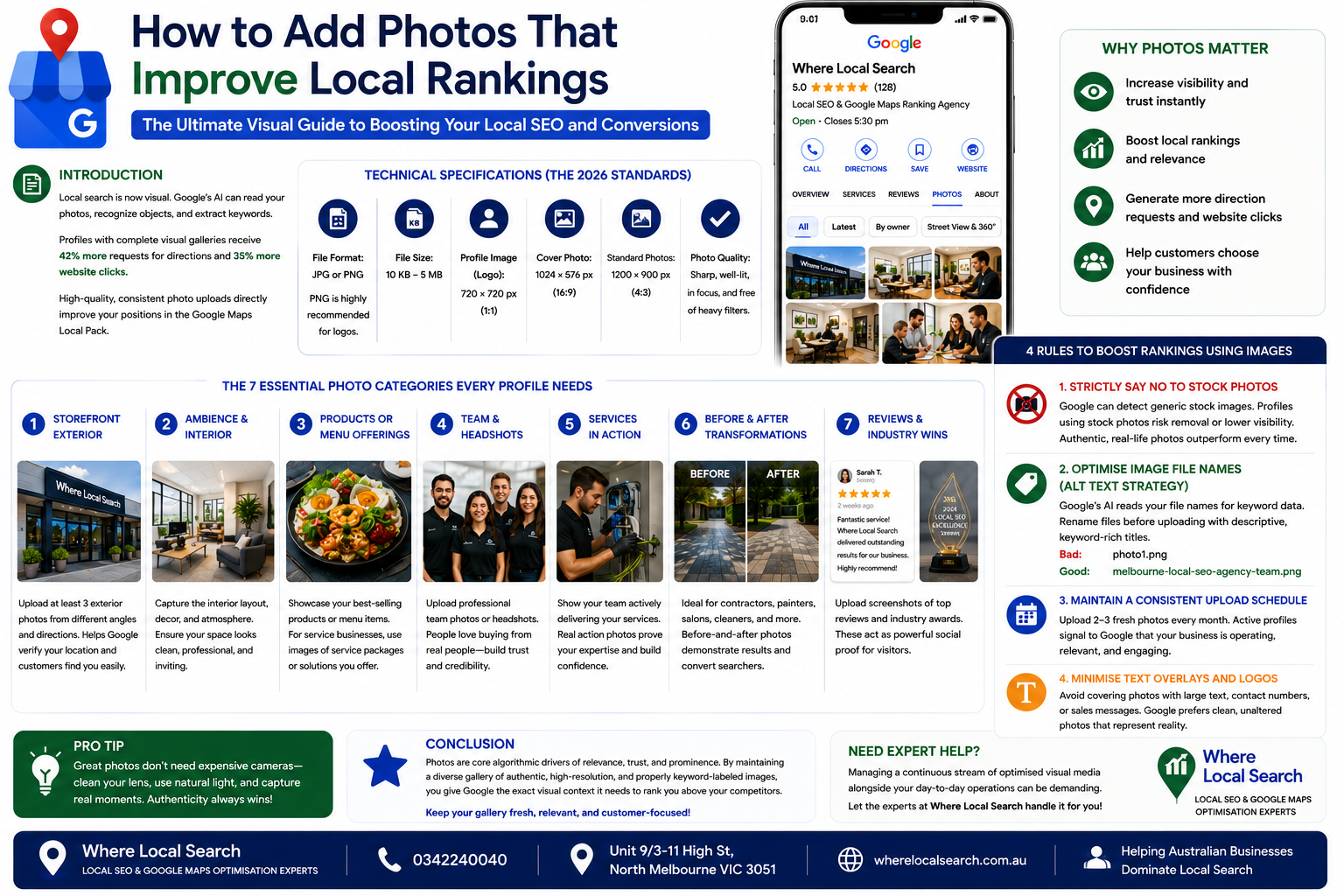
Technical Specifications (The 2026 Standards)
To ensure Google approves your images quickly and displays them perfectly across all mobile and desktop devices, you must follow these precise technical formats:
JPG or PNG. (PNG is highly recommended for logos to keep edges crisp).
Between 10 KB and 5 MB.
Recommended size is 720 × 720 px.
Recommended size is 1024 × 576 px (16:9 aspect ratio).
Ideal size is 1200 × 900 px.
Images must be sharply in focus, well-lit, and completely free of heavy filters or alterations that distort reality.
The 7 Essential Photo Categories Every Profile Needs
Google's algorithm values diversity in your image library. To maximize your relevance signals, you should upload a minimum of 10 to 20 total images distributed across these core categories:
1. Storefront Exterior Photos
Upload at least three high-resolution exterior photos shot from different angles and directions. This helps Google verify your real-world location and allows customers to easily recognize your building when arriving.
2. Ambience & Interior Photos
Capture the interior layout, decor, and atmosphere of your workspace, waiting areas, or seating zones. Make sure the space looks clean, professional, and inviting.
3. Products or Menu Offerings
If you sell physical items or food, take bright, clear shots of your best-selling inventory. For service-focused businesses, this can include visual representations of your core service packages.
4. Team & Headshots
Humanize your brand by uploading professional group photos or headshots of your staff. Customers prefer buying from real people, and team photos establish immediate trust.
5. Services in Action
Show your team actively performing their jobs—whether it's an electrician wiring a switchboard, a dentist consulting a patient, or an SEO expert presenting to a client.
6. Before-and-After Transformations
Highly effective for contractors, painters, beauty salons, and cleaning companies. Side-by-side comparison graphics prove your capability and convert casual searchers quickly.
7. Reviews and Industry Wins
Take screenshots of your absolute best historical customer reviews or industry awards and upload them directly to your photo section. This acts as permanent social proof for browsers scrolling your media tab.
4 Rules to Boost Rankings Using Images
Google's content policies explicitly discourage the use of generic stock photography. Their algorithm can easily detect duplicate internet imagery, and profiles relying on stock photos risk having their media removed or their visibility downgraded. Authentic, real-life smartphone photos easily outperform pristine stock images.
Google's AI crawlers read your file names to glean keyword data. Before uploading any image, rename the file from generic tags like IMG_4829.jpg to a keyword-rich, descriptive title.
❌ Bad: photo1.png
✅ Good: melbourne-local-seo-agency-team.png
Adding images is not a one-off task. Google favors active profiles. Uploading 2 to 3 fresh photos every month signals to the algorithm that your business is operating, relevant, and consistently engaging with the market.
While adding a subtle watermark is fine, avoid covering your photos with massive promotional text, contact numbers, or sales advertisements. Google prefers clean, unaltered photos that represent reality, and heavy text overlays can cause your images to fail the review process.
Conclusion
Photos are far more than just decorative elements; they are core algorithmic drivers of relevance, trust, and prominence. By maintaining a diverse gallery of authentic, high-resolution, and properly keyword-labeled images, you give Google the exact visual context it needs to rank you above your competitors.
Managing a continuous stream of optimized visual media alongside your day-to-day business operations can be demanding.
If you want to maximize your digital storefront's visual impact and scale your Google Maps visibility effortlessly, the team at Where Local Search is ready to step in. As leading experts in Australian Local SEO, we handle complete profile optimization, citation management, and visual asset scaling to ensure your local rankings turn directly into revenue.