
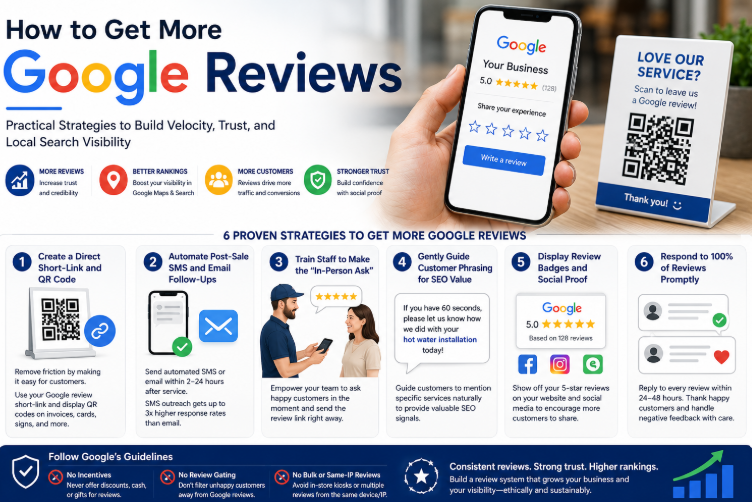
Practical Strategies to Build Velocity, Trust, and Local Search Visibility
Knowing that Google reviews drive Local SEO rankings is one thing; consistently acquiring a steady stream of authentic 5-star reviews is another. For many local businesses, getting satisfied customers to actually leave feedback feels like an uphill battle.
However, customer review generation should never be left to chance or sporadic manual outreach. Google's local search algorithm heavily penalizes dormant profiles and instead rewards Review Velocity—the steady, continuous flow of fresh customer feedback over time.
In this practical guide, we will outline proven, ethical strategies to streamline your review request process, eliminate friction for your customers, and build a scalable review generation system that elevates your Google Maps rankings.
6 Proven Strategies to Get More Google Reviews
1. Create a Direct Short-Link and QR Code
The biggest barrier to getting reviews is friction—if the process takes more than a few taps, customers will abandon it.
💡 The Tactic: Extract your official Google Review Short Link directly from your profile dashboard. Convert this link into a clean QR code using tools like Canva or Bitly. Place this QR code on physical touchpoints: invoices, receipt footers, business cards, counter displays, and vehicle wraps.
2. Automate Post-Sale SMS and Email Follow-Ups
Timing is everything. Asking for a review weeks after a job is completed drastically lowers your conversion rate.
💡 The Tactic: Integrate an automated review request system into your CRM or point-of-sale software. Set up an automated SMS or email trigger that fires within 2 to 24 hours after a service is successfully delivered, while the positive experience is fresh in the customer's mind. SMS outreach generally yields a 3x higher response rate than email.
3. Train Staff to Make the "In-Person Ask"
An automated text message works best when it follows a warm, in-person verbal request.
💡 The Tactic: Train your front-line staff, field technicians, or sales team to identify moments of customer delight. When a client expresses gratitude (e.g., "Thank you, you guys did an amazing job!"), staff should respond naturally: "We’re so glad you’re happy! Would you mind leaving us a quick Google review? I can text you the direct link right now."
4. Gently Guide Customer Phrasing for SEO Value
The text within a review provides valuable semantic signals that help Google understand what services you offer.
💡 The Tactic: When sending review requests, gently guide the client's phrasing without breaking Google’s strict rules against incentivization. Use a soft prompt in your text template like: "If you have 60 seconds, please let us know how we did with your [Insert Specific Service Name, e.g., hot water installation] today!"
5. Display Review Badges and Social Proof
People are naturally more inclined to leave a review when they see that others are actively doing the same.
💡 The Tactic: Embed a dynamic Google Review widget directly on your website’s homepage and contact pages. Share recent 5-star feedback on your official social media channels, tagging the post with a call-to-action inviting future clients to share their own experiences.
6. Respond to 100% of Reviews Promptly
When prospective reviewers see a business actively replying to every comment, they feel confident that their feedback will actually be seen and appreciated.
💡 The Tactic: Respond uniquely to every review within 24 to 48 hours. Thank positive reviewers warmly, and address any constructive or negative feedback with professional, solution-oriented empathy.
Strict Google Policy Rules: What NOT to Do
While building review velocity is critical, breaking Google's official guidelines can result in your reviews being permanently filtered or your entire business profile being suspended.
Never offer discounts, gift cards, cash, or entries into competitions in exchange for customer reviews.
Do not use software that filters unhappy customers away to a private form while routing only happy customers to Google.
Never have multiple customers log into Google from the same shopfront Wi-Fi or tablet, as Google auto-flags bulk reviews from a single IP.
Review Acquisition Workflow Summary
| Channel | Execution Strategy | Target Conversion Rate |
|---|---|---|
| Post-Sale SMS | Send automated text within 2–4 hours of service completion. | 15% – 25% |
| In-Person Ask | Verbal request paired with an immediate digital follow-up. | 30% – 40% |
| Email Invoice | Embedded review button or QR code on digital receipts. | 5% – 10% |
| Physical Signage | Countertop QR codes and business card printouts. | Continuous baseline flow |
Conclusion
Getting more Google reviews isn't about pushing customers; it's about removing friction, timing your requests perfectly, and maintaining an active, transparent relationship with your client base. By deploying automated post-sale workflows, training your team, and making access simple via short links and QR codes, you build a self-sustaining review engine that powers your local search visibility.
Setting up automated CRM integrations, managing review responses across platforms, protecting your profile against spam filters, and tracking local geo-grid progress requires consistent operational focus.
If you want to build a hands-free, high-converting Google review collection system and safely scale your Local SEO across Australia, the expert team at Where Local Search is here to manage it all for you. As specialized experts in Local SEO and Google Maps optimization, we build structured systems that turn everyday customer satisfaction into long-term commercial growth.