
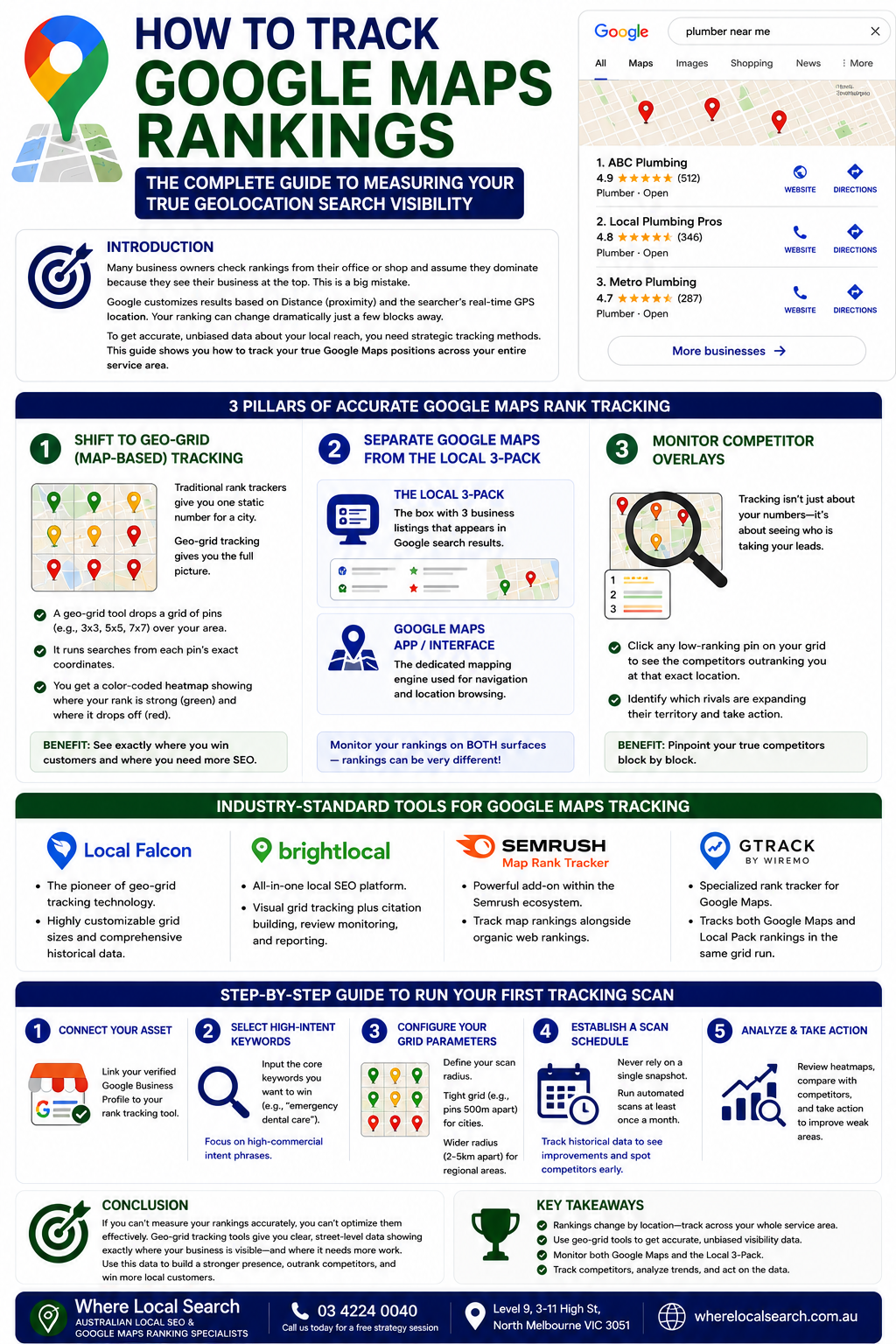
The Complete Guide to Measuring Your True Geolocation Search Visibility
Many local business owners check their Google Maps rankings by sitting at their office desk, opening their smartphone, and typing in their target keywords. When they see their business appearing at the very top, they assume they are dominating the local market.
Unfortunately, this is a major misconception. Google's local search algorithm heavily customizes results based on Distance (proximity) and the searcher's exact real-time GPS coordinates. Your business might rank #1 when you are standing inside your shop, but just two blocks away, you could easily drop to #12, making you completely invisible to potential customers. Furthermore, standard manual searches are heavily skewed by your personal browsing history and cookies.
To get an accurate, unbiased understanding of your local reach, you must use strategic tracking methods. In this guide, we will break down the exact tools and workflows required to track your true Google Maps positions across your entire service area.
3 Pillars of Accurate Google Maps Rank Tracking
1. Shift to Geo-Grid (Map-Based) Tracking
Traditional rank trackers only give you a single, static ranking number for a city (e.g., "Rank #3 in Melbourne"). This is highly inaccurate for local SEO. Modern tracking relies on a Geo-Grid heatmap.
- How it works: A geo-grid tool drops an interactive map grid (such as a 3x3, 5x5, or 7x7 grid of pins) over your target neighborhood.
- The benefit: The software executes localized searches from the exact coordinates of each individual pin. It then provides a color-coded map showing exactly where your rank is strong (green pins in the top 3) and where it drops off (red pins).
2. Separate Google Maps from the Local 3-Pack
One crucial distinction many marketers overlook is that local search happens on two entirely separate interfaces:
- The Google Local Pack: The box containing 3 business listings that appears inside the standard Google web search results page.
- Google Maps App/Interface: The dedicated mapping engine used for navigation and pure location browsing.
💡 Ensure your chosen tracking system monitors your positions across both surfaces, as rankings can vary between them.
3. Monitor Competitor Overlays
Rank tracking isn't just about watching your own numbers; it's about seeing who is taking your leads. A proper tracking setup allows you to click on any low-ranking pin on your geo-grid to see an overlay of the exact competitors outranking you at that specific street corner. This helps you pinpoint exactly which rival businesses are expanding their territory.
Industry-Standard Tools for Google Maps Tracking
The pioneer of geo-grid tracking technology. It offers highly customizable grid sizes and comprehensive historical data tracking.
An excellent all-in-one local SEO suite that combines visual grid tracking with citation building and automated review monitoring.
A powerful add-on tool within the broader Semrush ecosystem, perfect for businesses tracking organic web rankings and map rankings side-by-side.
A specialized rank tracker known for tracking both Google Maps and Local Pack rankings within the exact same grid run.
Step-by-Step Guide to Run Your First Tracking Scan
Link your verified Google Business Profile to your chosen rank tracking tool.
Input the core keywords you want to win (e.g., "emergency dental care", "locksmith near me"). Focus on high-commercial intent phrases rather than generic terms.
Define your scan radius. A tight, high-density grid (e.g., pins spaced 500 meters apart) is ideal for dense city centers, while a wider radius (pins spaced 2–5 kilometers apart) is better for regional service areas.
Never rely on a single snapshot. Configure your tool to run automated scans at least once a month. This logs clean historical data, allowing you to instantly see if your optimization work is paying off or if a new competitor is creeping into your area.
Conclusion
If you cannot measure your rankings accurately, you cannot optimize them effectively. Relying on basic manual searches from your business phone gives a false sense of security. By switching to professional geo-grid tracking tools, you gain clear, street-level data showing exactly where your digital storefront wins conversions and where it requires focused SEO optimization.
Setting up custom tracking systems, interpreting massive geo-grid reports, monitoring competitor movements, and adjusting on-page local schema markers takes significant technical expertise and time away from handling your core business operations.
If you want to eliminate the technical headache and ensure your local visibility is tracked and scaled flawlessly by industry professionals, the team at Where Local Search is here to guide you. As leading experts in Australian Local SEO and Google Maps Ranking, we deploy professional-grade tracking networks to continuously audit, defend, and grow your search visibility across your entire service area, transforming map views into sustainable commercial revenue.