
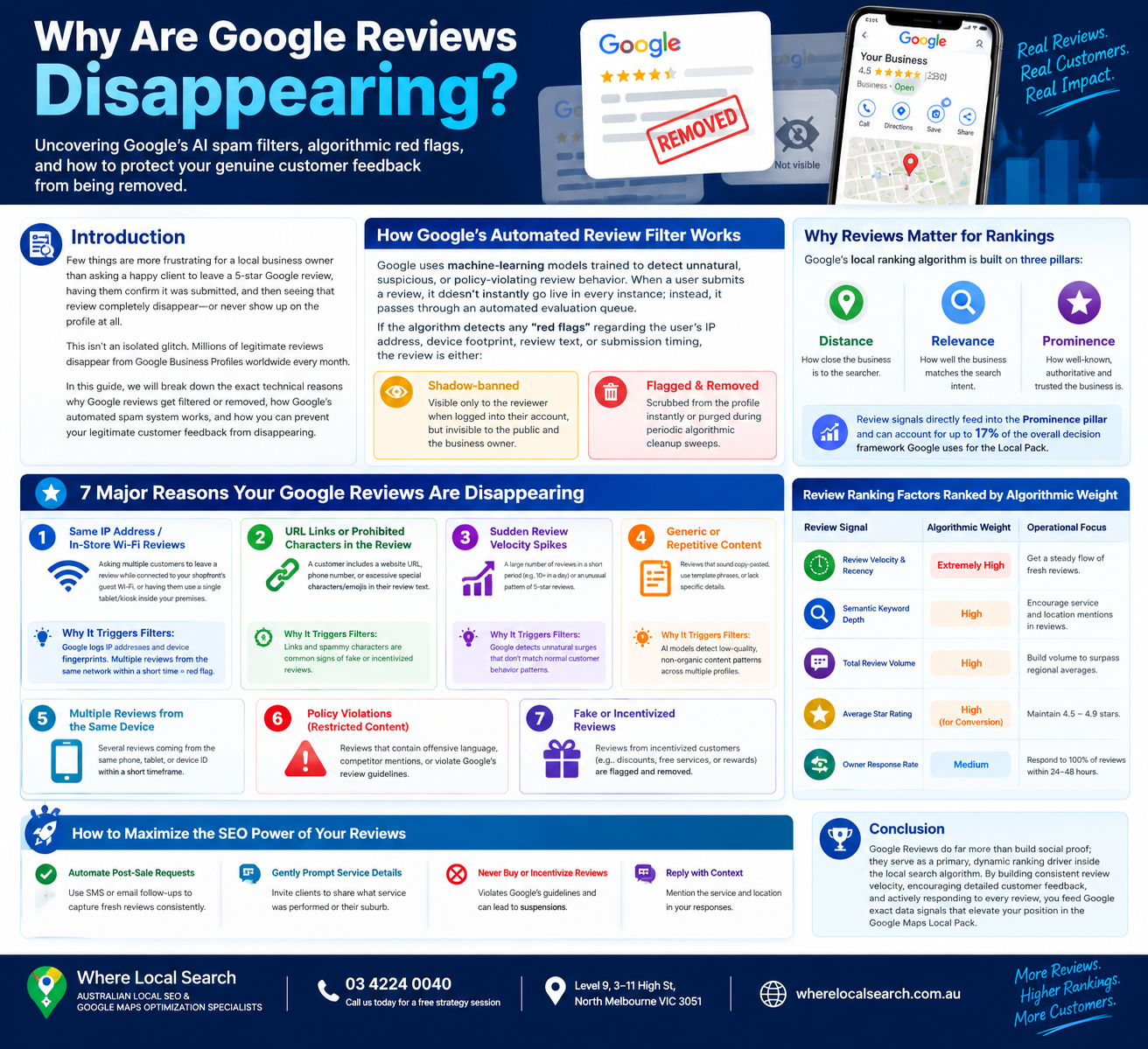
Uncovering Google’s AI Spam Filters and How to Protect Your Customer Feedback
Few things are more frustrating for a local business owner than asking a happy client to leave a 5-star Google review, having them confirm it was submitted, and then seeing that review completely disappear—or never show up on the profile at all.
This isn't an isolated glitch. Millions of legitimate reviews disappear from Google Business Profiles worldwide every month. As Google aggressively upgrades its automated spam detection systems and AI-driven moderation filters, the algorithms have become hyper-sensitive.
In this comprehensive guide, we will break down the exact technical reasons why Google reviews get filtered or removed, how Google's automated spam system works, and how you can prevent your legitimate customer feedback from disappearing.
How Google's Automated Review Filter Works
Google uses machine-learning models trained to detect unnatural, suspicious, or policy-violating review behavior. When a user submits a review, it doesn't instantly go live in every instance; instead, it passes through an automated evaluation queue.
If the algorithm detects any "red flags" regarding the user's IP address, device footprint, review text, or submission timing, the review is either:
Visible only to the reviewer when logged into their account, but invisible to the public and the business owner.
Scrubbed from the profile instantly or purged during periodic algorithmic cleanup sweeps.
7 Major Reasons Your Google Reviews Are Disappearing
Asking multiple customers to leave a review while connected to your shopfront's guest Wi-Fi, or having customers leave reviews on a single tablet/kiosk inside your premises.
💡 Why It Triggers Filters: Google logs IP addresses and device fingerprints. When multiple reviews originate from the exact same IP network within a short timeframe, it gets flagged as internal fake review generation.
A well-meaning customer includes a link to their own blog, a website URL, a phone number, or excessive special characters/emojis in their review text.
💡 Why It Triggers Filters: Google strictly prohibits URLs, phone numbers, and promotional links inside review bodies to prevent external web spam and phishing attempts.
Going months without a single review and suddenly receiving 15 or 20 reviews in a single day (e.g., after sending a mass email blast).
💡 Why It Triggers Filters: Abnormal, sudden spikes trigger automated fraud alerts. Google expects a steady, natural velocity of customer feedback over time rather than artificial bursts.
A client creates a brand-new Google account purely to leave your business a review, or uses an account with no prior location history or activity.
💡 Why It Triggers Filters: Google evaluates the trust score of the reviewer's account. Profiles with zero location history, no past contributions, or suspicious activity patterns are treated as potential bot accounts.
A customer leaves a review for a local service business (e.g., a local plumber in Melbourne) while their device GPS and profile history show they are physically located in another state or country.
💡 Why It Triggers Filters: Google tracks real-time device location data. If a user has never physically been near your operating area, the algorithm suspects the review was purchased or solicited remotely.
The review text contains words associated with profanity, hate speech, financial transactions, medical claims, or promotional spam (e.g., "cheap", "discount", "buy now").
💡 Why It Triggers Filters: Automated Natural Language Processing (NLP) filters flag suspicious keywords, removing the review immediately to maintain community safety standards.
Offering discounts, entry into competitions, or gift cards in exchange for reviews, or using software that filters negative reviews away from Google (Review Gating).
💡 Why It Triggers Filters: Both practices violate Google’s official guidelines. If reported, Google will run manual sweeps and purge large portions of your historical feedback.
How to Prevent Google Reviews From Getting Disappeared
☑ Never Use In-Store Kiosks or Shared Wi-Fi: Always have clients leave reviews using their own personal mobile data network (4G/5G) or from their home/office networks.
☑ Drip-Feed Your Review Requests: Avoid mass emailing your entire client list at once. Space out review requests daily or weekly to maintain a clean, natural review velocity.
☑ Provide Clean Short-Links: Send clients your official, direct Google Review short-link via SMS or email without attaching third-party tracking parameters.
☑ Instruct Clients to Avoid Links and Phone Numbers: Remind customers in your request template to keep feedback focused purely on their personal service experience without adding website URLs or phone numbers.
Can You Recover Disappeared Google Reviews?
If a legitimate review from a genuine client was wrongly filtered by mistake, you can attempt to recover it through official channels:
Request a screenshot of the review from the client logged into their Google account (where it remains visible to them).
Contact Google Business Profile Support via the official help center. Select Reviews and Photos → Missing Reviews.
Attach the screenshot showing the reviewer's name, profile details, and review text. If the account is legitimate, Google support agents can manually override the filter and restore the review.
Conclusion
Missing Google reviews are rarely the result of a random bug—they are usually caused by automated AI filters reacting to IP addresses, submission velocity, or account trust signals. By understanding these algorithmic triggers and structuring clean, steady review request processes, you ensure that your genuine customer feedback remains safe, visible, and working to boost your local search rankings.
Navigating complex review appeal processes, configuring CRM workflows to manage natural review velocity, and keeping up with shifting Google algorithms requires ongoing technical focus.
If you want to build a safe, fully compliant local review engine and protect your Google Maps rankings across Australia, the team at Where Local Search is here to assist you. As premier specialists in Local SEO and Google Maps optimization, we manage your profile health end-to-end, ensuring your digital footprint securely transforms customer trust into commercial growth.